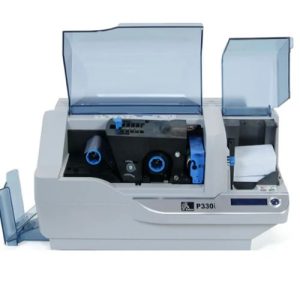
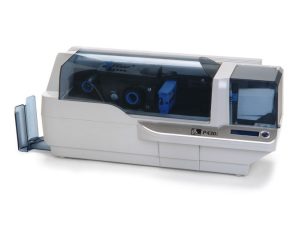
Proper cleaning of the Zebra ZXP Series 3 Card Printer is essential for maintaining print quality, preventing card jams, and protecting the printhead and internal rollers. Zebra recommends regular cleaning as part of routine maintenance, especially when the printer displays a CLEAN PRINTER message or when print defects occur.
When Cleaning Is Required
You should clean the printer when:
- The LCD panel displays CLEAN PRINTER
- Print quality degrades (spots, streaks, faded or uneven prints)
- Dust or debris accumulates inside the printer
- Persistent print issues are identified during troubleshooting
Regular cleaning is also recommended as preventive maintenance to extend printer life and maintain consistent output quality.
Materials Needed for Cleaning
To properly clean the Zebra ZXP Series 3 printer, prepare the following:
- Long path cleaning card
- Feeder cleaning card
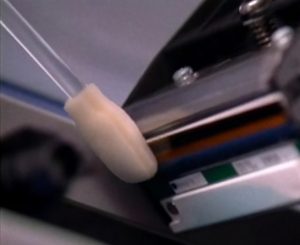
- Alcohol-moistened foam cleaning swab
- Power access to the printer
⚠️ Important:
Only use approved cleaning cards and foam-tipped swabs. Never use sharp tools or compressed air inside the printer, as this may cause permanent damage.
Step 1: Start the Printer Cleaning Cycle
- Turn the printer ON.
- Press and hold the Multi-Function Control Button for approximately 5 seconds.
- The LCD display will indicate that the cleaning cycle has started and prompt you to remove the ribbon.
This initiates the automated system cleaning process.
Step 2: Remove Ribbon and Clear Cards
- When prompted, open the printer lid.
- Remove the ribbon cartridge.
- Close the lid.
- The printer will automatically eject any card remaining inside.
The printer must be free of cards and ribbon before cleaning continues.
Step 3: Clean the Card Path with a Long Cleaning Card
- When the LCD displays FEED LONG CLEANING CARD, insert the long cleaning card.
- The printer will pull the card through the internal transport rollers.
- Once cleaning is complete, the printer will eject the card.
- Remove and discard the used cleaning card.
This step removes dust and debris from the internal rollers and card path.
Step 4: Clean the Card Feeder
- When prompted, open the card feeder cover.
- Insert the feeder cleaning card.
- Close the feeder cover.
- The printer will automatically clean the feeder rollers.
- Remove the feeder cleaning card when instructed.
Feeder cleaning prevents misfeeds and card pickup issues.
Step 5: Clean the Printhead Manually
If print quality issues persist, Zebra recommends cleaning the printhead separately.
- Turn the printer OFF.
- Open the printer lid to access the printhead.
- Gently wipe the printhead from side to side using an alcohol-moistened foam swab.
- Apply only light pressure.
- Allow the printhead to dry for 2–3 minutes before powering the printer back on.
⚠️ Caution:
Never scrape the printhead or use non-foam swabs, as this can permanently damage the printhead.
Step 6: Restore Printer to Normal Operation
- Reinstall the ribbon cartridge.
- Reload cards into the feeder.
- Close all covers securely.
- Power the printer ON.
- Confirm the LCD displays READY.
The printer is now ready for normal use.
Maintenance Best Practices
- Clean the printer at every ribbon replacement
- Store cards in a clean, dust-free environment
- Avoid touching card surfaces and internal printer components
- Follow LCD cleaning prompts immediately
Routine cleaning minimizes downtime and ensures reliable card printing performance.
Using high-quality, compatible cleaning supplies is essential for effective maintenance of the Zebra ZXP Series 3 Card Printer. MediTech offers a full range of Zebra-compatible cleaning cards and cleaning swabs designed to meet the printer’s cleaning requirements
MediTech Cleaning Card Recommendations
1. MediTech Long Cleaning Card (ZXP Series 3 Compatible)
- Designed for automated internal roller and card path cleaning
- Removes dust, debris, and residue from transport rollers
- Single-use, disposable design for optimal hygiene
Learn more: Kit di pulizia compatibile Zebra 105912-912-Meditech
2. MediTech Feeder Cleaning Card (ZXP Series 3 Compatible)
- Specifically designed for card feeder roller cleaning
- Helps prevent card misfeeds and double-feeding
MediTech Printhead Cleaning Swab Recommendations
MediTech Foam Cleaning Swabs (IPA Pre-Saturated)
- Soft foam-tipped head to prevent printhead damage
- Pre-saturated with high-purity isopropyl alcohol (IPA)
- Lint-free and residue-free
- Ideal for manual printhead cleaning
Learn more: Self-Saturated IPA Cleaning Swab – 4.5’’-Meditech
Why Choose MediTech-Compatible Cleaning Supplies?
- Fully compatible with Zebra ZXP Series 3 printers
- Cost-effective alternative to OEM supplies
- Suitable for routine maintenance and preventive cleaning programs
Using MediTech-compatible cleaning cards and swabs helps ensure consistent print quality, reduces downtime, and extends the service life of the printer.
 Meditech