 메디테크
메디테크


건 청소에 대한 완벽한 가이드: 팁, 도구 및 기법
3978이 전체 가이드를 통해 올바른 방법으로 건을 세척하는 방법을 알아보세요. 전문가의 청소 팁, 단계별 지침, 메디텍 면봉 및 청소용 물티슈와 같은 프리미엄 도구를 살펴보세요. 지금 바로 클린룸 등급의 총기 세척 용품을 구매하세요.
세부 정보 보기제품 검색게시물 검색
Keeping your Zebra ZXP Series 7 card printer in optimal condition is essential for producing clear, professional ID cards. Routine maintenance not only improves print quality but also protects the printhead, rollers, and internal components from costly damage. This guide walks you through how to properly clean your ZXP Series 7 using a 청소 카드, 청소용 물티슈, and other approved supplies.
The ZXP Series 7 is designed for high-performance printing, but dust, card debris, and ribbon residue gradually build up in the printer’s critical areas. According to the official user manual, regular cleaning maintains your warranty and helps protect hard-to-reach parts like the printhead, transport rollers, and magnetic encoder station.
Recommended cleaning intervals for a typical office environment:
Zebra recommends using only approved cleaning supplies. For the Zebra ZXP Series 7, you may need:
All cleaning functions are accessed through the Operator Control Panel (OCP):
This is the most frequently required cleaning routine.
Steps:
Cleaning the feeder ensures smooth card feeding and prevents jams.
Steps:
Printhead polishing is recommended every 5,000 cards, especially when you notice ghosting or faded print.
Note: This feature is password-protected and limited to Zebra-authorized service personnel.
Steps:
- Enable printhead polishing in the ZXP Toolbox.
- Open the cover and ribbon drawer; remove the ribbon.
- Insert a polishing (lapping) card grit-side-up into the Manual Feed Slot.
- Run the cleaning cycle and wait for the card to eject.
- Replace the ribbon.
The laminator includes three separate cleaning routines:
Requires cleaning swabs / cleaning wipes.
MediTech provides high-quality, cost-effective cleaning supplies fully compatible with Zebra ZXP Series 7 printers:
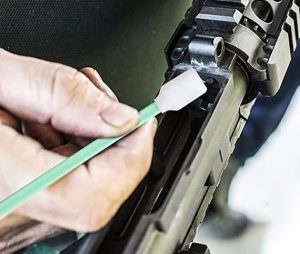
이 전체 가이드를 통해 올바른 방법으로 건을 세척하는 방법을 알아보세요. 전문가의 청소 팁, 단계별 지침, 메디텍 면봉 및 청소용 물티슈와 같은 프리미엄 도구를 살펴보세요. 지금 바로 클린룸 등급의 총기 세척 용품을 구매하세요.
세부 정보 보기1 청소 절차를 시작하기 전에 컴퓨터를 종료하고 키보드 커넥터를 분리하세요. 컴퓨터가 실행 중일 때는 키보드를 분리하거나 연결하지 마세요. USB 기반이 아닌 키보드를 사용하는 경우 컴퓨터가 손상될 수 있습니다. 키보... 분리하기
세부 정보 보기정제 된 면봉과 호출은 간판의 클린 룸에서 일종의 깨끗한 면화 생산입니다. 정제 된면은 일반적으로 흡수성, 인성, 내마모성 및 기타 특성이 높으며 닦는 장치를 긁지 않고 부스러기가 없습니다...
세부 정보 보기산술 결과를 입력합니다.
계산이 잘못되었습니다. 다시 입력하세요.