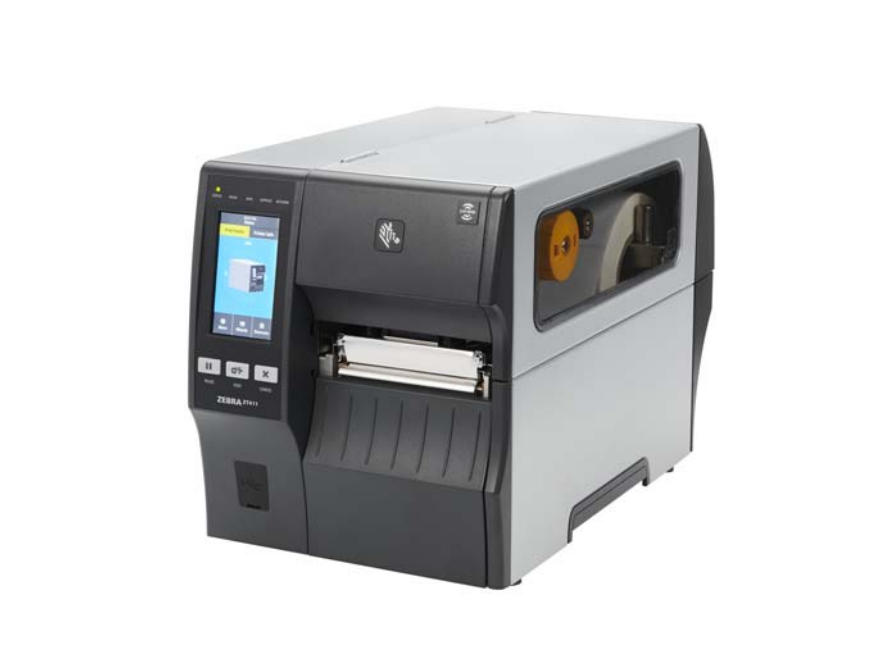
Regular maintenance is key to keeping your Zebra ZT411 and ZT421 printers running smoothly. Over time, dust, ribbon residue, and label adhesive can build up on the printhead and platen roller, leading to poor print quality and shortened component lifespan. This blog post covers the correct cleaning schedule and step-by-step procedure recommended by Zebra.
Why Cleaning Your ZT411/ZT421 Is Important
Thermal printers like the Zebra ZT411 and ZT421 rely on precise heat transfer. When the printhead or platen roller is dirty, you may notice:
Faded or missing print areas
Streaky or uneven labels
Barcodes that fail to scan correctly
Frequent label jams or misalignment
Routine maintenance not only improves print quality but also extends the lifespan of your printhead and platen roller — saving you from costly replacements.
Recommended Cleaning Schedule
Zebra recommends cleaning your printer components according to usage:
Component
Cleaning Method
Frequency
Printhead
IPA Swab or Cleaning Card
After every ribbon or media roll
Platen Roller (Standard)
IPA Swab
After every roll
Linerless Platen Roller
Sticky side of linerless label (no alcohol)
After every roll
Media & Ribbon Sensors
Compressed air
Every roll
Tear Bar / Peel Bar
IPA Swab
Monthly
🧼 Tip: Use MediTech’s 99% Isopropyl Alcohol (IPA) Cleaning Swabs for safe, residue-free cleaning. Each swab is pre-saturated with high-purity IPA, ideal for removing adhesive, dust, and ink buildup.
How to Clean the Printhead and Platen Roller
Step 1: Prepare for Cleaning
Open the media door.
Allow the printhead to cool (it may be hot after use).
Power off the printer for safety and discharge static electricity by touching the metal printer frame.
Step 2: Remove Media and Ribbon
Lift the printhead-open lever upward.
Remove any loaded media or ribbon to access the printhead surface.
Step 3: Clean the Printhead
Use a Zebra-approved cleaning swab or a lint-free swab dipped in 99.7% isopropyl alcohol.
Gently wipe the brown strip on the printhead from end to end.
Allow the solvent to evaporate completely before continuing.
Step 4: Clean the Platen Roller
For standard (white) rollers: Rotate manually and clean thoroughly using the same swab.
For linerless (dark brown) rollers: Do not use alcohol or swabs—lightly touch the roller surface with the sticky side of a linerless label to lift debris.
Step 5: Reload and Resume Printing
Reload your media and ribbon, close the printhead assembly, and lock it in place.
Close the media door and press PAUSE to resume operation.
The printer may feed or calibrate automatically.
Best Practices for Long-Term Maintenance
Always use high-quality media and ribbons to minimize debris.
Avoid harsh cleaning agents or abrasive materials.
Store your printer in a dust-free, temperature-controlled environment.
Regularly check for buildup in the media path and sensors.
Common Signs It’s Time to Clean
Barcodes fail to scan correctly.
Print appears faded, uneven, or has missing sections.
Labels feed improperly or drift out of alignment.
“Printhead needs cleaning” warning appears on the display.
When these issues occur, follow the cleaning steps above before seeking service.
Conclusion
Maintaining your Zebra ZT411 or ZT421 printer doesn’t just keep prints looking sharp — it reduces downtime, prevents costly repairs, and extends printhead life. By following Zebra’s recommended cleaning procedures, you’ll ensure your industrial printers operate at peak performance day after day.
Comment utiliser le stylo de nettoyage pour imprimante ? L'utilisation d'imprimantes thermiques pendant une longue période, parce que les résidus de toner de la tête d'impression entraînent une mauvaise impression, a un impact direct sur l'imprimante thermique. Comment nettoyer la tête de l'imprimante ? Maintenant, introduisons...
PCB (Printed Circuit Board), also known as printed circuit board, is an important electronic components, is the support of electronic components, but also the electronic components of the electrical connection carrier &...
Qu'est-ce que la carte de nettoyage CR80 ? Dans quels endroits la carte de nettoyage CR80 peut-elle être utilisée ? Quel est l'effet nettoyant de la carte de nettoyage CR80 ? Cette série de problèmes vous laisse perplexe quant à la compréhension de la carte de nettoyage CR80 par votre ami, et le Medietch vous propose de...
Lorsque l'écran LCD de l'imprimante affiche "nettoyer l'imprimante" ou que la qualité d'impression est mauvaise, il est temps de nettoyer votre imprimante à cartes ZXP 3. Vous avez alors besoin des kits de nettoyage des imprimantes des séries ZXP 1 & ZXP 3 qui comprennent : 4 cartes de nettoyage du moteur d'impression et 4 cartes de nettoyage du chargeur ...
 Meditech