 메디테크
메디테크


Zebra P330i 카드 프린터를 청소하는 방법?
2950컬러 카드 1000장 또는 흑백 카드 5000장을 인쇄한 후 Zebra P330i LCD에 "프린터 청소 중"이라는 메시지가 표시되며, 좋은 인쇄 결과를 얻으려면 가능한 한 빨리 프린터를 청소해야 합니다. 그렇다면 Zebra P33을 청소하는 방법은 다음과 같습니다.
세부 정보 보기제품 검색게시물 검색
Regular maintenance of your Primacy Lamination card printer ensures optimal performance, extends its lifespan, and guarantees high-quality printed cards. One of the most important maintenance tasks is cleaning the lamination module with a special adhesive cleaning card. Follow the instructions below to properly clean your printer.
We recommend using the MediTech Adhesive Cleaning Card, designed for professional printer cleaning and trusted by businesses worldwide.
By following this cleaning procedure, you ensure that your Primacy Lamination card printer continues to deliver professional results.
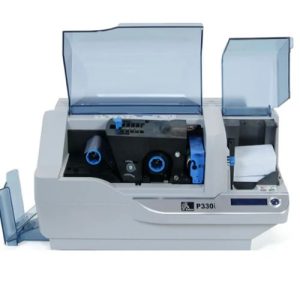
컬러 카드 1000장 또는 흑백 카드 5000장을 인쇄한 후 Zebra P330i LCD에 "프린터 청소 중"이라는 메시지가 표시되며, 좋은 인쇄 결과를 얻으려면 가능한 한 빨리 프린터를 청소해야 합니다. 그렇다면 Zebra P33을 청소하는 방법은 다음과 같습니다.
세부 정보 보기스폰지 클리닝 면봉(먼지 없는 스폰지 면봉) FS757은 100 PPI 폴리우레탄 스폰지와 폴리프로필렌 막대로 만들어졌습니다. 두 가지 열가소성 공정으로 만들어져 스폰지가 폴리프로필렌 막대와 단단히 융합되어 접착제 오염을 방지하지만 ...
세부 정보 보기지폐 인식기는 많은 공공 장소에서 사용됩니다. 예를 들어 역에서 티켓을 구매하는 데 사용하는 기계, 길거리에서 쇼핑하는 소매 기계 등은 모두 지폐 인식기를 사용해야 하며, 위의 기계는 일반적으로 ...
세부 정보 보기산술 결과를 입력합니다.
계산이 잘못되었습니다. 다시 입력하세요.