 Meditech


Introdução do pano de limpeza de microfibras sem pó
2861Introduction of microfiber dust-free wiping cloth Product characteristics of microfiber dust-free wiping cloth: Application of dust-free wiping cloth:
Ver pormenoresPesquisar produtoProcurar publicação
The printhead is the most critical and delicate component of your Evolis Zenius card printer. Proper printhead maintenance not only ensures sharp, vibrant card printing but also extends the lifespan of the printer and reduces costly downtime.
Over time, card dust, adhesive residue, and environmental contaminants can accumulate on the printhead, causing print defects such as white lines, missing colors, blurred images, and inconsistent print quality. Regular Evolis Zenius printhead cleaning helps prevent these issues and keeps your printer operating at peak performance.
Every PVC card that passes through the printer generates microscopic particles. These particles gradually build up on the printhead and internal printer components.
A dirty printhead can cause:
Routine cleaning removes contaminants before they damage the printhead, helping maintain consistent print quality and extending printer life.
Watch for the following symptoms:
One of the most common indicators of a contaminated printhead is the appearance of thin white lines running across printed cards.
If certain color panels are not printing correctly, dirt or residue may be preventing proper heat transfer.
Blurry text, faded graphics, or inconsistent print results often indicate that the printhead requires cleaning.
Dust accumulation can interfere with normal printer operation and lead to unexpected maintenance warnings.
For most card-printing environments, regular cleaning should be performed according to printer usage and maintenance alerts.
Evolis recommends routine cleaning at scheduled intervals to maintain warranty coverage and protect the printhead. The printer’s cleaning indicator typically alerts users when maintenance is required.
If your printer operates in dusty environments or processes high volumes of cards, more frequent cleaning may be necessary.
Before starting, prepare:
Power off the printer and disconnect the power cable.
Carefully open the printer cover and locate the printhead assembly.
Never touch the printhead surface directly with your fingers. Oils from your skin can permanently damage the printhead.
Using an IPA cleaning swab or cleaning pen, gently wipe the printhead from one side to the other using smooth motions.
Do not scrub aggressively or use excessive force.
Wait until the alcohol has completely evaporated before restarting the printer and printing cards. Evolis recommends allowing sufficient drying time after cleaning.
Using high-quality cleaning supplies is essential for safe and effective maintenance.
Using high-quality cleaning supplies is essential for safe and effective maintenance.Meditech specializes in professional printer cleaning products and compatible maintenance kits for card printers worldwide.
Advantages include:
Whether you need printhead cleaning swabs, cleaning pen, adhesive cleaning cards, or complete Evolis-compatible cleaning kits, Meditech provides dependable maintenance solutions that help maximize printer performance and lifespan.
Explore Meditech’s complete range of Evolis-compatible cleaning products: Kit de limpeza compatível Evolis-Meditech
Introduction of microfiber dust-free wiping cloth Product characteristics of microfiber dust-free wiping cloth: Application of dust-free wiping cloth:
Ver pormenores
What is cleaning swab? Swabs what effect is there? This series of questions are puzzling us. In order to understand the swabs, we take swabs used in electronic field as an example, to help you understand the cleaning swab. What is cleaning swab? A...
Ver pormenores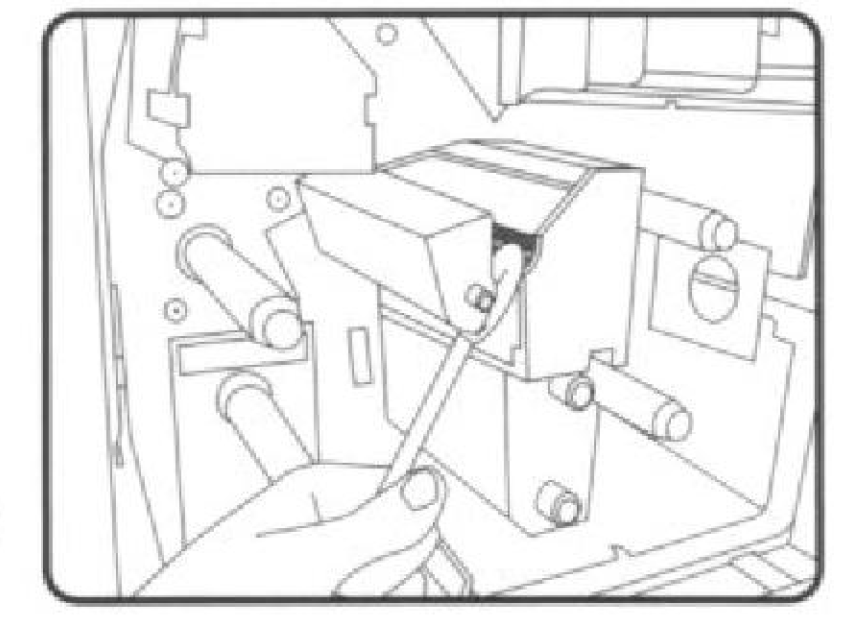
A impressora é usada há muito tempo, o local mais provável de sujeira é a cabeça da impressora, se a cabeça de impressão não puder ser mantida limpa, isso afetará a qualidade da impressão ou causará danos à impressora. Então, como devemos limpar a cabeça de impressão? I...
Ver pormenoresThis is a cleaning instruction for a common cash count. 1.Turn off the cash count. 2.Remove the hopper and the feeder. 3.Use a brush to remove the dust on the roles and sensors. 4.Remove the remaining dust with dust spray remover. 5.Close the feed...
Ver pormenoresIntroduzir o resultado aritmético.
Cálculo incorreto, por favor volte a introduzir.