 メディテック


スクリーン用クリーニング製品
2599スクリーンのためのクリーニング製品 スクリーンのためのクリーニング製品を含む:、
詳細を見る製品検索検索ポスト
Regular maintenance is key to keeping your Zebra ZT411 and ZT421 printers running smoothly. Over time, dust, ribbon residue, and label adhesive can build up on the printhead and platen roller, leading to poor print quality and shortened component lifespan. This blog post covers the correct cleaning schedule and step-by-step procedure recommended by Zebra.
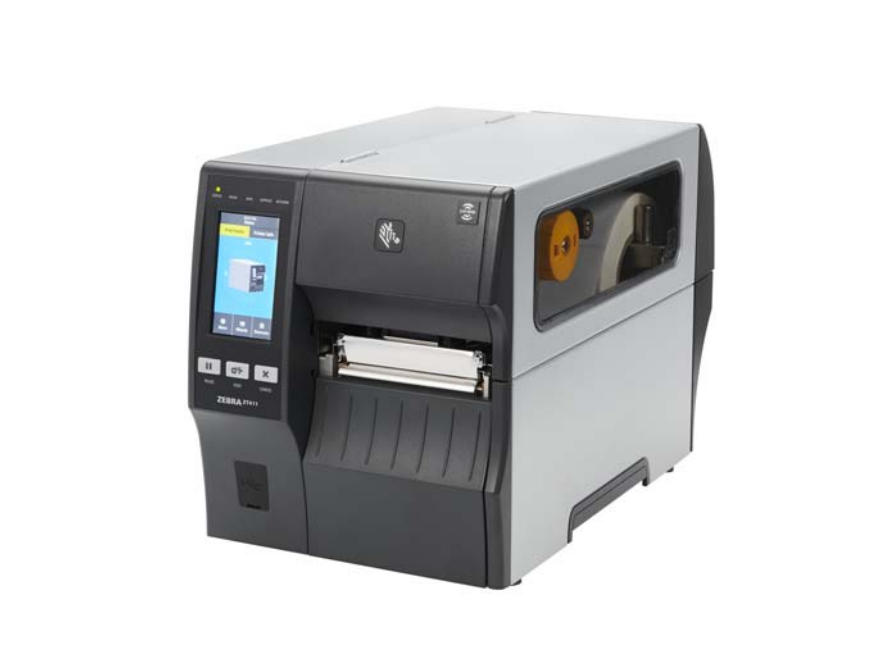
Thermal printers like the Zebra ZT411 and ZT421 rely on precise heat transfer. When the printhead or platen roller is dirty, you may notice:
Routine maintenance not only improves print quality but also extends the lifespan of your printhead and platen roller — saving you from costly replacements.
Zebra recommends cleaning your printer components according to usage:
| Component | Cleaning Method | Frequency |
|---|---|---|
| Printhead | IPA Swab or Cleaning Card | After every ribbon or media roll |
| Platen Roller (Standard) | IPA Swab | After every roll |
| Linerless Platen Roller | Sticky side of linerless label (no alcohol) | After every roll |
| Media & Ribbon Sensors | Compressed air | Every roll |
| Tear Bar / Peel Bar | IPA Swab | Monthly |
🧼 Tip: Use MediTech’s 99% Isopropyl Alcohol (IPA) Cleaning Swabs for safe, residue-free cleaning. Each swab is pre-saturated with high-purity IPA, ideal for removing adhesive, dust, and ink buildup.
When these issues occur, follow the cleaning steps above before seeking service.
Maintaining your Zebra ZT411 or ZT421 printer doesn’t just keep prints looking sharp — it reduces downtime, prevents costly repairs, and extends printhead life. By following Zebra’s recommended cleaning procedures, you’ll ensure your industrial printers operate at peak performance day after day.
Discover answers to the most common questions about cleanroom swabs—including types, materials, sterile vs. non-sterile options, selection tips, and proper usage.
詳細を見るこれらの綿棒のプラスチックハンドルは、99.9% IPA Solution.Simplyスクイーズまたはプラスチックハンドルをスナップで満たされており、フォームヘッドは、バック&クリーンクリーニングを使用することにより、クリーニングSolution.Cleanのちょうど良い量で飽和状態になります。
詳細を見る演算結果を入力する。
計算が間違っています。