 Meditech


Common Questions About Cleanroom Swabs
390Discover answers to the most common questions about cleanroom swabs—including types, materials, sterile vs. non-sterile options, selection tips, and proper usage.
View detailsSearch productSearch post
Have you met with print error on your barcode printer?
1.Print is too light
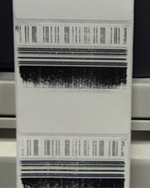
It may caused by contaminant left on the print head. If you never clean the print head, the print quality would become lighter and lighter.
2.White lines in the print
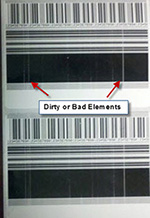
This may caused by dirty or bad elements.
Believe it or not, the biggest enemy of your printer is not your employee, it comes from the debris, dirt, glue, residue.
When the print error occurred, barcode scanners are unable to read the barcode correctly, it will waste you a lot of time.
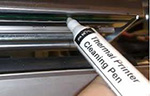
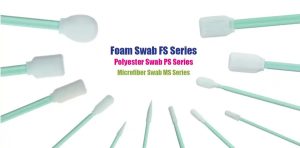
Most of the situation can be simply solved by just one Cleaning Pen(Or Cleaning Swab).
Discover answers to the most common questions about cleanroom swabs—including types, materials, sterile vs. non-sterile options, selection tips, and proper usage.
View detailsDollor Bill Validator/acceptor Cleaning Cards work in all bill validators and readers regardless of manufacturer or model. They remove deposits dirty bills leave on read heads and rollers, and keep money flowing through your bill validators, reade...
View detailsSpecifications1.Blending polyester,cellulose and PVC card 2.For cleaning swab contaminants from Zebra printers 3.P330i/P120i/P100i clean DecriptionThe IPS Snap&nb...
View detailsWhen the printer LCD display “clean printer” or the print quality is bad, it’s time to clean your ZXP 3 card printer. Then you need ZXP 1 & ZXP 3 series printer cleaning kits which includes: 4 print engine cleaning cards and 4 feeder cleaning ...
View detailsEnter the arithmetic result.
Incorrect calculation, please re-enter.