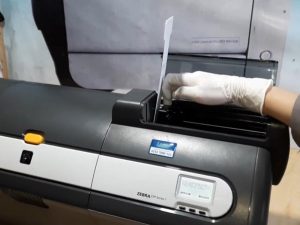
How to use the Printhead Cleaning Pen?
How to use the Printer Cleaning Pen?
The use of thermal printers for a long time, because the head of the print head toner residue lead to poor print, a direct impact on the thermal printer. How to clean the head of the printer?

Now, let’s introduce the Meditech Printhead Cleaning Pen and how to use it correctly.
1. Disconnect the power supply to ensure safety.
2. Open the printer and find the position of the print head.
3, remove the printer cleaning pen, rotary cap or pull directly.
4, let the pen tip of the cleaning pen contact the print head smoothly and erase it back and forth on the print head. (the head of the cleaning pen is a IPA solution with a good volatility, without worrying about the remaining liquid on the print head).
5, open the power supply, test the cleaning effect, if not clean, can repeat the above steps, again clean.
 Meditech