Search productSearch post

How to use the printer cleaning pen

News 1250

In the previous article, we talked about the printer for cleaning and maintenance in time, otherwise, can lead to equipment can’t normal use. Last time we mainly is to use clean swab to clean the printer, the print head for this time we are around the printer maintenance, teach you how to use the printer cleaning pen.

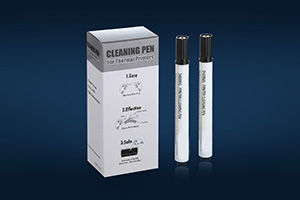
cleaning pen

First of all, we must first turn on the thermal printer, find a printer to print head.
Second, take out our cleaning pen, in general, our cleaning pen is conducted in accordance with a box of a box packaging good, need you open box, remove a cleaning pen.
Then remove the cleaning pen cap, let pen parts in the print head can rub back and forth several times.
Note: because our cleaning pen head is IPA easy, volatile. So after used up printer cleaning pen, must cover the lid.

The prev: The next:

Related recommendations

  • Fiber Optic Cleaning Swab Stick FS741

    1470

    As the Foamtec HT1003 and Texwipe TX741B Alternatives Cleaning Swab Sticks, FS741 become increasingly hotter choice for cleaning fiber optics. I have to say something about fiber optics first of all and then I will introduce you one of our best se...

    View details
  • How to cleaning a Printer ?

    1150

    Benefits: When your print job isn’t up to par, you can get rid of smudges, white lines and reduce paper jams by simply cleaning your printer. Of course, the real benefit of cleaning is that it saves you money by prolonging the life of your printer...

    View details
  • The cleanroom swabs born from purification room

    1051

    Many places are required to be spotless and clean, for example,some high-grade business places which need to provide high-quality environment for people. Some baby delivery rooms also need to be dust-free which will provide a healthy living...

    View details
Expand more!

Enter the arithmetic result.

Incorrect calculation, please re-enter.